Magic Keyboard on iPhone
January 24, 2026
I want to do more writing this year and have been experimenting with iPhone compatible Bluetooth keyboards for an ultra portable writing set up. Recently I discovered that the iPhone has surprising good support for Apple’s Magic Keyboard.
It turns out iOS has surprising good support for this keyboard, likely because there’s a popular iPad version which doubles as a case.
In a way, using Apple’s Magic Keyboard with an iPhone is the dream combination. I love the layout, as it’s the same as the MacBook keyboard. I’ve used MacBooks for years, so this avoids any of the awkwardness with adjusting to a slightly different layout.
Now I already own a Bluetooth Magic Keyboard, I bought it originally to use with my MacBook, basically I never ended up using it because I much prefer the positioning of the trackpad under the keyboard on the MacBook rather than positioning a trackpad at the side. I’ve written a rant about this.
Pairing
The keyboard is easy to pair with the iPhone; you just need to switch it on and make sure it’s not paired with any other devices. Out of the box, the media keys support iOS shortcuts, which is a nice touch.
The main thing I found myself using to switch apps is that you can get Spotlight with Command + Space and then use this to launch the app you want.
Weight and Portability
The weight is actually pretty low at 243 g, so not that much more than travel Bluetooth keyboards. My main concern would be about chucking it in a bag without a case, as it’s a fairly expensive keyboard.
Also, size-wise, you are going to need a small bag, compared to a folding keyboard, which you could put in your pocket. Below are photos of the Moko folding keyboard I own for comparison. Below is a size comparison of the keyboards with the Moko, unfolded there’s not a huge difference in size.
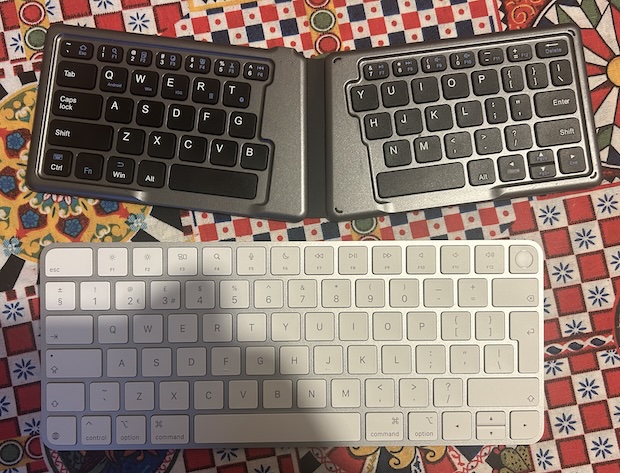
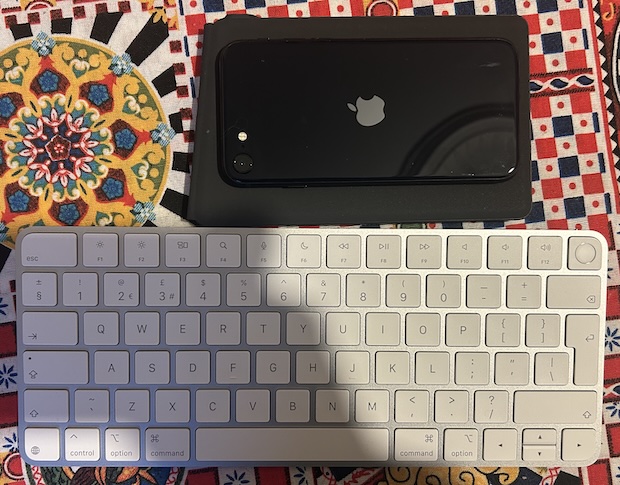
The advantage of the MoKo Foldable Keyboard is it’s protected when it’s folded, so you don’t need a sleeve or case to stop it getting damaged. Below is a size comparison wit the folded keyboard, I’ve also included an iPhone 12 for scale.
What Next?
I’m going to try using it for a week or so, then decide which Bluetooth keyboard to settle on using with my iPhone.
I’ve ordered a case for popping the keyboard in a bag and portable stand to get the iPhone to a better height so I don’t get neck ache.
Details on Controls
Here are details on controlling your iPhone using the Magic Keyboard and shortcuts.
To get to the home screen, you can type Globe + H. F3 shows you all your open apps, but I haven’t found a way to select the one I want without interacting with the touchscreen yet.
As mentioned earlier in the article, I found Command + Space for Spotlight to search for apps was the best way to switch.
You can enable full keyboard access/controls, which lets you navigate the iPhone almost completely using the keyboard. Whilst this sounds cool, I found it was actually a bit fiddly and reduced my productivity, so I switched it off.
Macbook External Keyboard and Trackpad Rant
You can attempt to achieve this with an external keyboard and trackpad, but it doesn’t work as nicely for a number of reasons: The top of the trackpad is higher than the bottom of the keyboard, so you need to rig something up so they sit at the same height.
You can buy devices to do this on Etsy, I also made one at home as a test. However, even with this, the Apple external trackpad has an annoying setting where it doesn’t disable while you’re typing, causing the cursor to move on screen. This is a known issue and different from how the built-in trackpad and keyboard work, rant over.
If you'd like to contact me then you can email writing@petegraham.co.uk or message me on BlueSky petexgraham.bsky.social.